
Transform how you work with Power BI - Get started now!

Transform how you work with Power BI - Get started now!

Get instant access to automated documentation, intelligent chat, and actionable diagnostics. Start your free trial today!

Get instant access to automated documentation, intelligent chat, and actionable diagnostics. Start your free trial today!

Transform how you work with Power BI - Get started now!

Get instant access to automated documentation, intelligent chat, and actionable diagnostics. Start your free trial today!

Product

From Complexity to Clarity with AI

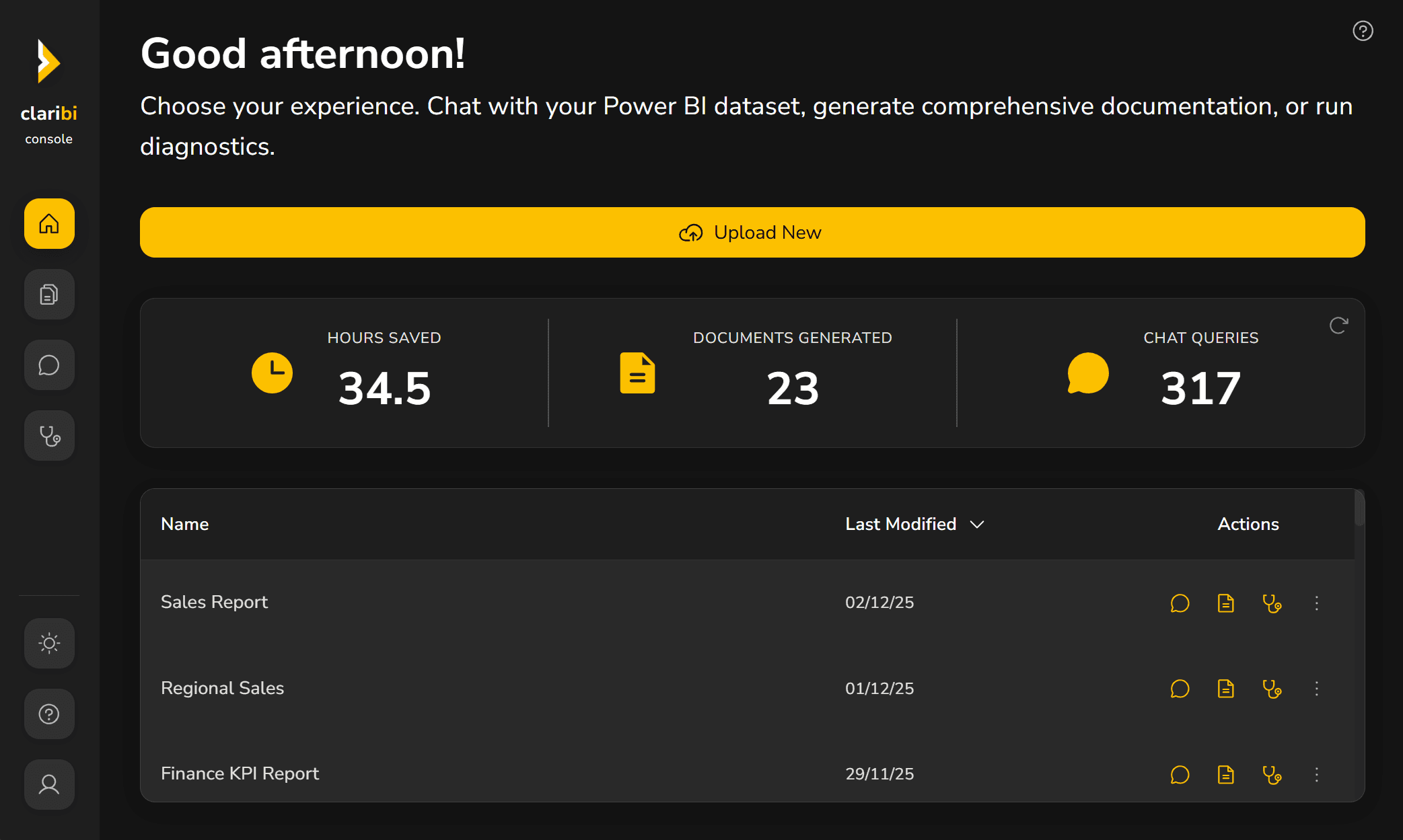
Claribi Console automates Power BI documentation, provides intelligent diagnostics, and offers a smart chat to help you write, debug, and improve your reports. Save time, reduce errors, and maintain full data privacy while unlocking your team's full potential.
Product

From Complexity to Clarity with AI

Claribi Console automates Power BI documentation, provides intelligent diagnostics, and offers a smart chat to help you write, debug, and improve your reports. Save time, reduce errors, and maintain full data privacy while unlocking your team's full potential.

Product

From Complexity to Clarity with AI

Claribi Console automates Power BI documentation, provides intelligent diagnostics, and offers a smart chat to help you write, debug, and improve your reports. Save time, reduce errors, and maintain full data privacy while unlocking your team's full potential.

Lazy loaded image

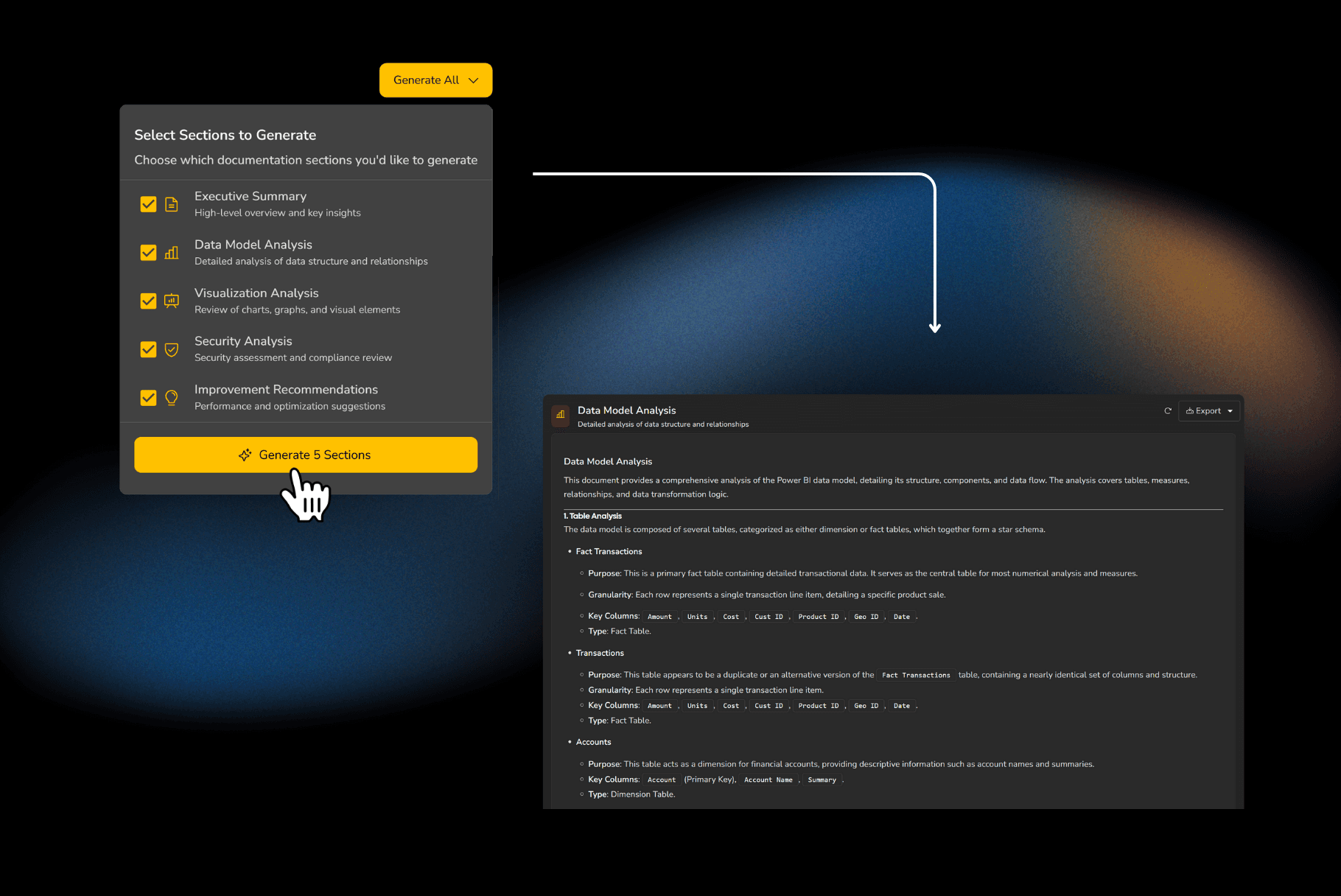
Instant Documentation with a Single Click

Generate full Power BI documentation instantly. With one click, Claribi Console creates a complete breakdown of your report and dataset: every DAX measure explained, your data model outlined, your report pages and their visuals, and all Power Query steps detailed. No more manual documentation, guarantee quality and instant availability.
Lazy loaded image

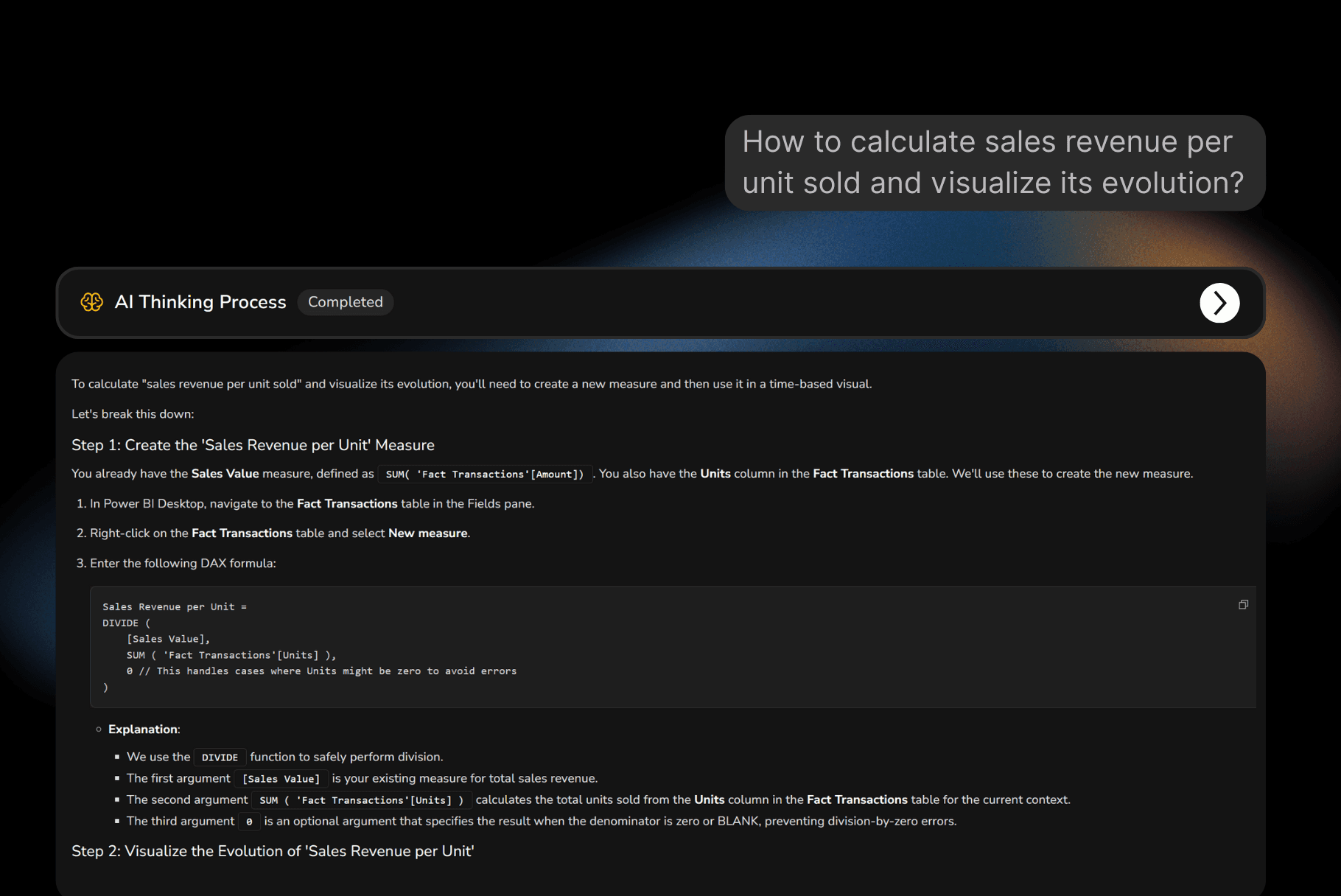
Intelligent Chat with Report Context

Ask questions about your Power BI datasets and reports and get precise, actionable answers in seconds. Whether you need a new DAX measure, help with complex logic, support with report visuals or ideas for model improvements, simply describe what you need and Claribi Console responds instantly with guidance tailored to your reports.
Lazy loaded image

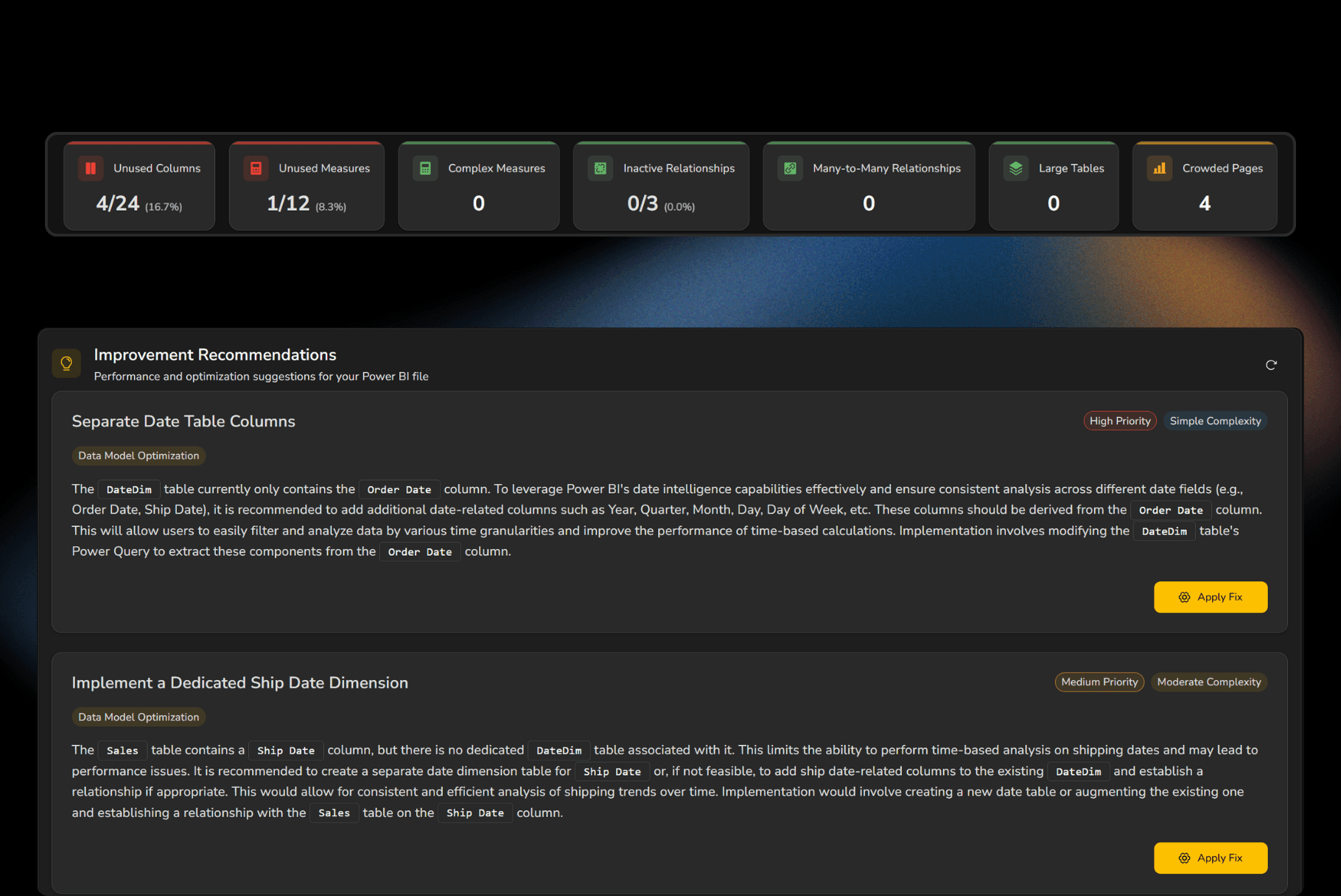
Report Improvement Recommendation

Analyze your Power BI reports end to end to highlight concrete opportunities to improve performance, robustness, and maintainability. With prioritized recommendations, you can quickly identify bottlenecks, optimize inefficient DAX, apply best practices across your organization, and turn every report into a fast, reliable, and scalable asset.​

Save Hours Every Week

Automate repetitive tasks like documentation, debugging, and report analysis. Claribi Console eliminates manual work so you can focus on what truly matters, delivering meaningful insights and building better reports.

Save Hours Every Week

Automate repetitive tasks like documentation, debugging, and report analysis. Claribi Console eliminates manual work so you can focus on what truly matters, delivering meaningful insights and building better reports.

Save Hours Every Week

Automate repetitive tasks like documentation, debugging, and report analysis. Claribi Console eliminates manual work so you can focus on what truly matters, delivering meaningful insights and building better reports.

Empower Every Member

Whether you're a Power BI expert or just getting started, Claribi Console guides you every step of the way. Get clear, actionable answers to complex questions and build reports with confidence, no advanced training required.

Empower Every Member

Whether you're a Power BI expert or just getting started, Claribi Console guides you every step of the way. Get clear, actionable answers to complex questions and build reports with confidence, no advanced training required.

Empower Every Member

Whether you're a Power BI expert or just getting started, Claribi Console guides you every step of the way. Get clear, actionable answers to complex questions and build reports with confidence, no advanced training required.

Your Data Stays Secure

Claribi Console never accesses your raw data. We analyze only the metadata, your report structure, DAX formulas, and Power Query steps. Your sensitive business information remains completely private and under your control.

Your Data Stays Secure

Claribi Console never accesses your raw data. We analyze only the metadata, your report structure, DAX formulas, and Power Query steps. Your sensitive business information remains completely private and under your control.

Your Data Stays Secure

Claribi Console never accesses your raw data. We analyze only the metadata, your report structure, DAX formulas, and Power Query steps. Your sensitive business information remains completely private and under your control.

Pricing Plans

Choose the Perfect Plan for You

Find the right option and start making the most of our AI-powered platform today!

Pricing Plans

Choose the Perfect Plan for You

Find the right option and start making the most of our AI-powered platform today!

BASIC

BASIC

€13

€13

€9

/month

€9

/month

For Power BI developers looking to accelerate their workflow with AI-powered assistance and streamline report development.

Up to 20 instant documentation generations

Up to 20 instant documentation generations

Up to 200 actionable improvement recommendations

Up to 200 actionable improvement recommendations

Up to 100 AI-powered chat interactions

Up to 100 AI-powered chat interactions

Complete privacy - metadata analysis only

Complete privacy - metadata analysis only

PREMIUM

PREMIUM

RECOMMENDED

RECOMMENDED

€21

€21

€15

/month

€15

/month

For Power BI developers seeking expanded capacity and intensive AI support to transform how they build, optimize, and maintain reports.

Up to 50 instant documentation generations

Up to 50 instant documentation generations

Up to 500 actionable improvement recommendations

Up to 500 actionable improvement recommendations

Up to 300 AI-powered chat interactions

Up to 300 AI-powered chat interactions

Complete privacy - metadata analysis only

Complete privacy - metadata analysis only

Pricing Plans

Choose the Perfect Plan for You

Find the right option and start making the most of our AI-powered platform today!

BASIC

€13

€9

/month

For Power BI developers looking to accelerate their workflow with AI-powered assistance and streamline report development.

Up to 20 instant documentation generations

Up to 200 actionable improvement recommendations

Up to 100 AI-powered chat interactions

Complete privacy - metadata analysis only

PREMIUM

RECOMMENDED

€21

€15

/month

For Power BI developers seeking expanded capacity and intensive AI support to transform how they build, optimize, and maintain reports.

Up to 50 instant documentation generations

Up to 500 actionable improvement recommendations

Up to 300 AI-powered chat interactions

Complete privacy - metadata analysis only

Frequently Asked Questions

Wondering About Something? Let’s Clear Things Up!

We’ve gathered all the important info right here. Explore our FAQs and find the answers you need.

Frequently Asked Questions

Wondering About Something? Let’s Clear Things Up!

We’ve gathered all the important info right here. Explore our FAQs and find the answers you need.

Frequently Asked Questions

Wondering About Something? Let’s Clear Things Up!

We’ve gathered all the important info right here. Explore our FAQs and find the answers you need.

How can Claribi Console help me with my Power BI work?

Claribi Console transforms your Power BI workflow through three powerful capabilities. First, it generates instant documentation with a single click, providing complete breakdowns of your DAX measures, data models, and Power Query steps. Second, it offers an intelligent AI chat that helps you write new measures, debug complex logic, and get step-by-step explanations tailored to your specific reports. Third, it provides automatic diagnostics that analyze your reports end to end and deliver prioritized recommendations to improve performance, accuracy, and maintainability. Whether you're documenting existing reports, building new ones, or optimizing current work, Claribi Console saves hours every week and helps you build with confidence.

Is my data secure with Claribi Console?

Yes, your data stays completely secure. Claribi Console never accesses your raw business data. We analyze only the metadata from your Power BI reports, including your report structure, DAX formulas, Power Query steps, and data model relationships. Your actual data, customer information, sales figures, financial records, never leaves your environment and remains completely private and under your control. This metadata-only approach ensures you get powerful AI assistance while maintaining full data privacy and security.

How do I manage my subscription or make changes to my plan?

All your subscription changes (including upgrading, downgrading, or canceling) are handled securely through our payment partner, Lemon Squeezy. You can manage your account by clicking the "Manage Subscription" link in your original purchase receipt email or by logging into the Claribi Customer Portal (store.claribi.ai/billing) with the email address used at checkout. Once inside the portal, you have the flexibility to update your payment methods, download invoices, or end your plan instantly with a single click.

What happens when I reach my monthly usage limits?

When you reach your monthly limit for document generations, diagnostic recommendations, or chat interactions, you'll be notified within the application. You can either wait until your limits reset at the start of your next billing cycle or upgrade to the Premium plan for higher capacity. All your existing work and documentation remain accessible regardless of your usage limits, so you never lose access to what you've already created.

Do I need to install anything to use Claribi Console?

No installation required. Claribi Console is a fully web-based application. Simply log in at console.claribi.ai, upload your .pbix file, and you're ready to go. Our AI instantly analyzes the metadata to provide documentation, diagnostics, and intelligent chat assistance, all through your web browser. No plugins, no downloads, no complex setup. Just upload and start working smarter.

Who can I contact if I need help or have questions?

Our support team is here to help. If you have any questions, encounter issues, or need assistance with Claribi Console, please reach out to us at support@claribi.ai. We're committed to ensuring you get the most out of Claribi Console and will respond to your inquiries as quickly as possible.

How can Claribi Console help me with my Power BI work?

Claribi Console transforms your Power BI workflow through three powerful capabilities. First, it generates instant documentation with a single click, providing complete breakdowns of your DAX measures, data models, and Power Query steps. Second, it offers an intelligent AI chat that helps you write new measures, debug complex logic, and get step-by-step explanations tailored to your specific reports. Third, it provides automatic diagnostics that analyze your reports end to end and deliver prioritized recommendations to improve performance, accuracy, and maintainability. Whether you're documenting existing reports, building new ones, or optimizing current work, Claribi Console saves hours every week and helps you build with confidence.

Is my data secure with Claribi Console?

Yes, your data stays completely secure. Claribi Console never accesses your raw business data. We analyze only the metadata from your Power BI reports, including your report structure, DAX formulas, Power Query steps, and data model relationships. Your actual data, customer information, sales figures, financial records, never leaves your environment and remains completely private and under your control. This metadata-only approach ensures you get powerful AI assistance while maintaining full data privacy and security.

How do I manage my subscription or make changes to my plan?

All your subscription changes (including upgrading, downgrading, or canceling) are handled securely through our payment partner, Lemon Squeezy. You can manage your account by clicking the "Manage Subscription" link in your original purchase receipt email or by logging into the Claribi Customer Portal (store.claribi.ai/billing) with the email address used at checkout. Once inside the portal, you have the flexibility to update your payment methods, download invoices, or end your plan instantly with a single click.

What happens when I reach my monthly usage limits?

When you reach your monthly limit for document generations, diagnostic recommendations, or chat interactions, you'll be notified within the application. You can either wait until your limits reset at the start of your next billing cycle or upgrade to the Premium plan for higher capacity. All your existing work and documentation remain accessible regardless of your usage limits, so you never lose access to what you've already created.

Do I need to install anything to use Claribi Console?

No installation required. Claribi Console is a fully web-based application. Simply log in at console.claribi.ai, upload your .pbix file, and you're ready to go. Our AI instantly analyzes the metadata to provide documentation, diagnostics, and intelligent chat assistance, all through your web browser. No plugins, no downloads, no complex setup. Just upload and start working smarter.

Who can I contact if I need help or have questions?

Our support team is here to help. If you have any questions, encounter issues, or need assistance with Claribi Console, please reach out to us at support@claribi.ai. We're committed to ensuring you get the most out of Claribi Console and will respond to your inquiries as quickly as possible.

How can Claribi Console help me with my Power BI work?

Claribi Console transforms your Power BI workflow through three powerful capabilities. First, it generates instant documentation with a single click, providing complete breakdowns of your DAX measures, data models, and Power Query steps. Second, it offers an intelligent AI chat that helps you write new measures, debug complex logic, and get step-by-step explanations tailored to your specific reports. Third, it provides automatic diagnostics that analyze your reports end to end and deliver prioritized recommendations to improve performance, accuracy, and maintainability. Whether you're documenting existing reports, building new ones, or optimizing current work, Claribi Console saves hours every week and helps you build with confidence.

Is my data secure with Claribi Console?

Yes, your data stays completely secure. Claribi Console never accesses your raw business data. We analyze only the metadata from your Power BI reports, including your report structure, DAX formulas, Power Query steps, and data model relationships. Your actual data, customer information, sales figures, financial records, never leaves your environment and remains completely private and under your control. This metadata-only approach ensures you get powerful AI assistance while maintaining full data privacy and security.

How do I manage my subscription or make changes to my plan?

All your subscription changes (including upgrading, downgrading, or canceling) are handled securely through our payment partner, Lemon Squeezy. You can manage your account by clicking the "Manage Subscription" link in your original purchase receipt email or by logging into the Claribi Customer Portal (store.claribi.ai/billing) with the email address used at checkout. Once inside the portal, you have the flexibility to update your payment methods, download invoices, or end your plan instantly with a single click.

What happens when I reach my monthly usage limits?

When you reach your monthly limit for document generations, diagnostic recommendations, or chat interactions, you'll be notified within the application. You can either wait until your limits reset at the start of your next billing cycle or upgrade to the Premium plan for higher capacity. All your existing work and documentation remain accessible regardless of your usage limits, so you never lose access to what you've already created.

Do I need to install anything to use Claribi Console?

No installation required. Claribi Console is a fully web-based application. Simply log in at console.claribi.ai, upload your .pbix file, and you're ready to go. Our AI instantly analyzes the metadata to provide documentation, diagnostics, and intelligent chat assistance, all through your web browser. No plugins, no downloads, no complex setup. Just upload and start working smarter.

Who can I contact if I need help or have questions?

Our support team is here to help. If you have any questions, encounter issues, or need assistance with Claribi Console, please reach out to us at support@claribi.ai. We're committed to ensuring you get the most out of Claribi Console and will respond to your inquiries as quickly as possible.